


If you need a document notarized while traveling, living abroad, or working remotely, you may not need to visit a local notary. A remote online notarization allows you to complete the process electronically through a secure video meeting with an authorized notary.
In many cases, the live session can be completed in about five minutes. The total time depends on your document, identity verification, internet connection, and the requirements of the organization receiving the document.
We provide remote notarization services nationwide and internationally through New York State licensed notaries. Use our booking page to request a remote notary appointment.
What you need before starting
Prepare the following items before you begin your online notary session:
- The document requiring notarization
- A valid government-issued photo ID
- A computer or mobile device with a camera
- A working microphone and speakers
- A stable internet connection
- The email address where you want to receive the completed document
- Confirmation that the receiving organization accepts remote online notarization
Your document should usually be available as an electronic file, such as a PDF. Do not sign it before the session unless the notary or receiving organization specifically instructs you to do so.
Step 1: Confirm that online notarization is accepted
Before you book an online notary service, ask the recipient whether it accepts a document notarized through remote online notarization, also called RON.
The receiving organization may be:
- A court
- A government agency
- A bank
- An insurance company
- A school or university
- An employer
- A real estate company
- A foreign authority
Ask a direct question:
> “Will you accept a document notarized electronically by a U.S. remote online notary?”
Acceptance depends on the document and the recipient. Some organizations may require an original paper document, a wet-ink signature, a raised seal, or a notary located in a specific state.
Remote notarization is not the same as scanning a paper document or using a regular video call. The notary must complete the required identity verification, electronic signing, electronic seal, recordkeeping, and audio-video procedures.
Step 2: Upload your document
After you select a provider, upload the complete document to the online system or submit it through the provider’s request form.
Review the document before the appointment:
- Make sure all pages are included.
- Check that names are spelled correctly.
- Confirm that signature and notarial certificate sections are present.
- Leave required signature fields unsigned.
- Do not add information that belongs to the notary.
- Confirm whether witnesses are required.
A notary can verify identity and witness the signing process. A notary generally cannot choose the legal wording for your document, explain legal consequences, or tell you which form to use.
If you need legal advice, contact an attorney or another qualified legal professional.
You can use our request page to provide your details and submit your notarization request.
Step 3: Complete identity verification
Identity verification is a required part of most remote online notarization services.
You will normally be asked to:
- Upload or display your government-issued photo ID.
- Allow the system to review the ID.
- Answer identity questions or complete another identity-proofing process.
- Join a live audio-video session with the notary.
- Show the ID again when requested.
A passport is often useful for clients outside the United States. A driver’s license or other government-issued identification may also be accepted, depending on the notary’s requirements and the applicable law.
Make sure your ID is:
- Current and not expired
- Clearly visible
- Not damaged
- Free from glare
- Easy to read on camera
If the name on your document is different from the name on your ID, tell the notary before the session. Additional documentation or another process may be required.
Step 4: Meet the notary by secure video
After your identity is verified, you will connect with the notary through real-time audio and video.
The notary may confirm:
- Your identity
- Your current location
- That you understand what you are signing
- That you are signing voluntarily
- That you can communicate with the notary
- That the document is complete and ready to sign
- Whether witnesses are present, if required
For a New York electronic notarization, the notary must be physically located in New York during the notarial act. The signer may be located outside New York or outside the United States, subject to applicable requirements and acceptance by the receiving organization.
You should be in a private location where you can speak clearly. Do not join the session while driving, in a noisy public area, or where another person is directing your answers.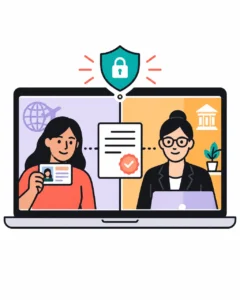
Step 5: Sign electronically
When the notary confirms that the requirements are complete, you will sign the document electronically.
The notary then completes the notarial certificate and applies an electronic signature and electronic seal. The final document may include security features that help show whether it has been changed after notarization.
A typical remote notarization includes:
- Your electronic signature
- The notary’s electronic signature
- The notary’s electronic seal
- The completed notarial certificate
- A record of the notarization
- An audio-video recording, when required
The National Notary Association describes the standard RON process as including document upload, identity screening, live audio-video communication, electronic signatures, an electronic seal, required records, and return of the notarized document. Review its remote online notarization guide for general background.
Step 6: Download and send the completed document
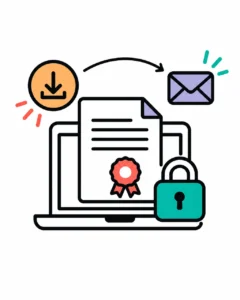
After the notary finishes the session, you will receive the completed electronic document according to the provider’s process.
Save a copy in a secure location. Then send it to the organization that requested the notarization.
Before sending it, check:
- Every page is included.
- Your signature appears correctly.
- The notarial certificate is complete.
- The electronic seal is visible.
- The recipient’s delivery instructions have been followed.
- The file has not been altered after notarization.
Do not edit, re-save, or modify the notarized PDF unless the recipient specifically tells you how to do so. Changes may affect the document’s validation or acceptance.
Can you notarize a document online from another country?
In many cases, yes. You may be able to complete a U.S. remote online notarization while you are abroad. The notary’s location, the applicable state law, the type of document, and the recipient’s rules all matter.
You do not usually need to travel to the United States for the live session. However, you should confirm acceptance before booking. A foreign government, consulate, court, bank, or other organization may have separate requirements.
For example, the recipient may request:
- A paper original
- A specific state’s notary
- An apostille
- Embassy or consular legalization
- A certified copy
- A wet-ink signature
- Additional witnesses
- A specific notarial certificate
Remote notarization and apostille services are separate steps. An apostille authenticates the signature, seal, or authority on a document for use in another country. If your recipient requires an apostille after notarization, review our apostille request page.
Documents that may require additional review
Many common documents can be notarized online when the recipient accepts RON. Examples may include:
- Affidavits
- Acknowledgments
- Powers of attorney
- Insurance documents
- Business documents
- Certain real estate documents
- General legal documents
Some documents require special handling. Real estate transactions, estate-planning documents, documents involving witnesses, and documents intended for use in another country should be reviewed before the appointment.
We may not be able to handle every document through the same online process. Some documents must be notarized in person on paper. Our website explains that services are performed electronically and recommends using a traditional notary when a physical paper document is required.
How to complete the process in about five minutes
Use this short preparation list:
- Confirm that the recipient accepts remote online notarization.
- Prepare the complete unsigned document.
- Have your valid photo ID ready.
- Use a device with a working camera and microphone.
- Connect from a quiet, private location.
- Complete identity verification.
- Meet the notary by live video.
- Sign electronically when instructed.
- Download the completed document.
- Send it to the receiving organization.
The live notarial act may take about five minutes for a simple document. Identity verification, witness coordination, document review, technical issues, or special recipient requirements may add time.
Request a remote online notary
We provide remote online notarization for clients in the United States and abroad. Our New York State licensed notaries handle the process electronically, with identity verification and appointment instructions provided before the session.
To proceed:
Important: We are not attorneys and cannot provide legal advice about your document, immigration matter, or transaction. Confirm the recipient’s requirements before requesting an online notary service.

Leave a Reply